
You Could Be Missing Hundreds of yuu Points Right Now — Here’s How to Fix It
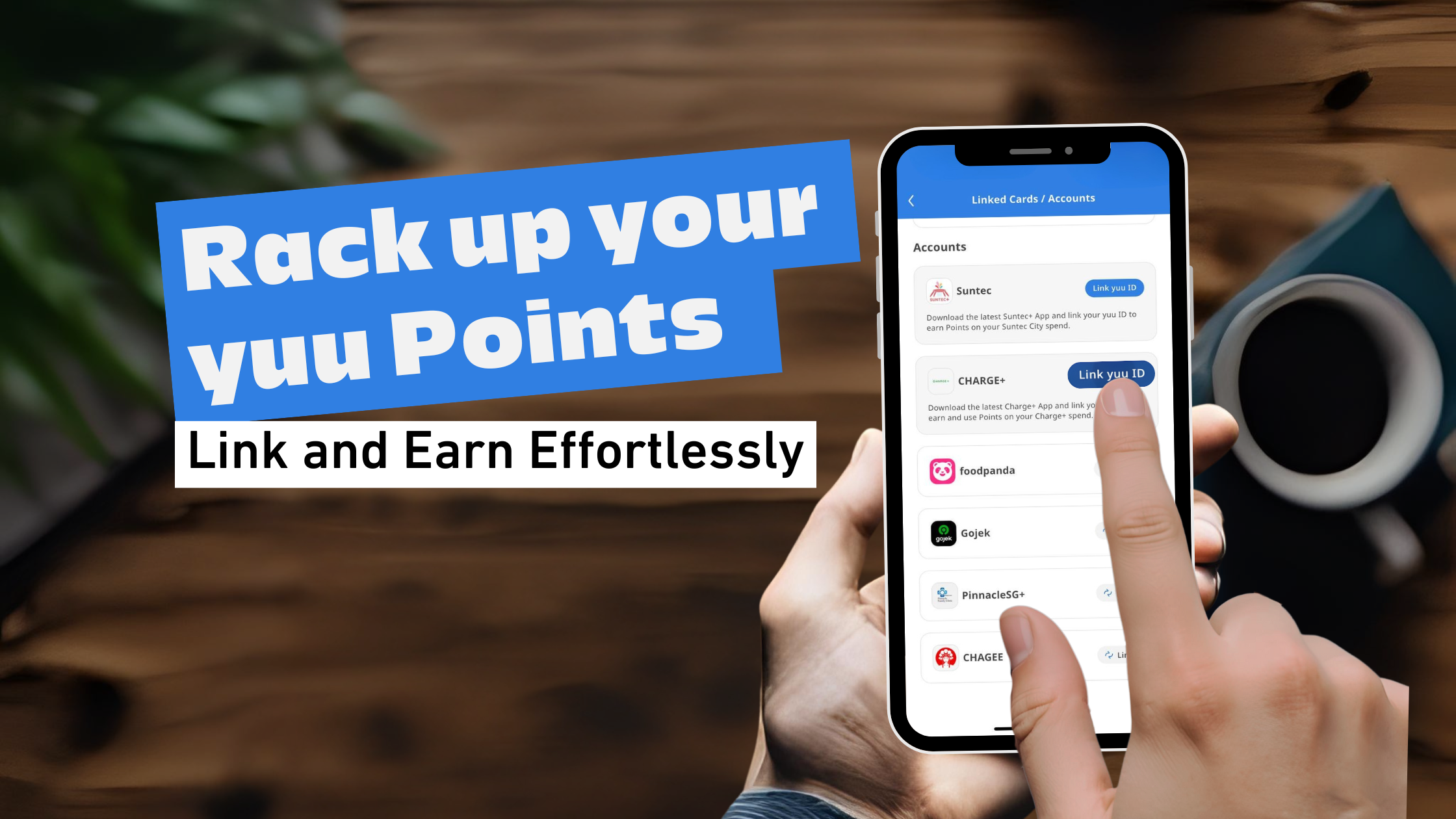
🚨Have you ever wondered how to really maximise your yuu Points? I've been there too and let me tell you, linking your yuu ID to your favourite apps is a game-changer.
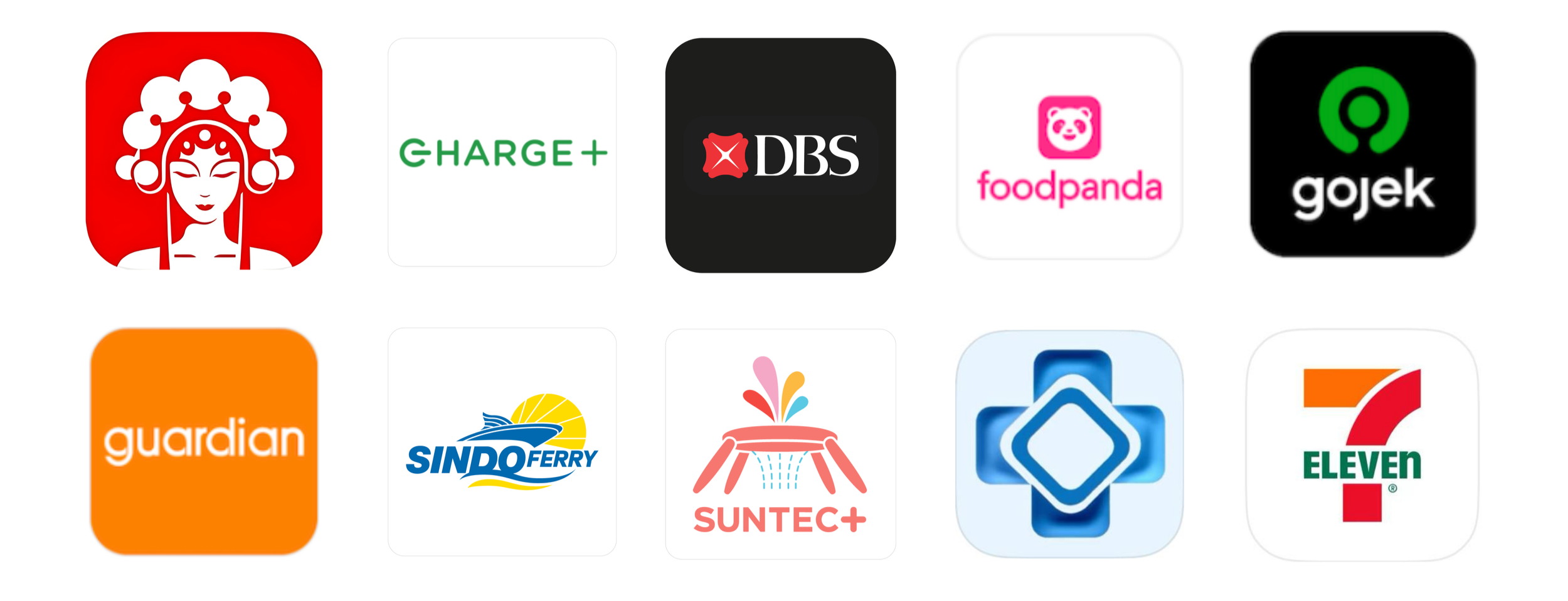
It completely transformed how I earn Points and enjoy exclusive perks from my daily activities. When your accounts are linked, you unlock a world of benefits every time you shop, ride, or dine.
Here’s 4 Reasons why you should be linking your yuu Account to yuu Partner Apps:
Don’t leave money on the table by not linking to our Partner apps! You could easily rack up 500 yuu Points when you link your yuu ID and earn effortlessly with every spend!
Don’t miss out on all the Rewards you could redeem without spending a single cent. You can redeem a $5 Gojek Cash Voucher with 500 yuu Points or a cup of CHAGEE Fresh Milk Tea (Large) with 620 yuu Points that you’ve racked up.
Don’t miss out on the joy of Paying with Points on Apps like foodpanda and enjoy a discount off your food delivery!
Don’t miss out on all the yuu Member benefits that you can enjoy for FREE!
yuu Member Exclusive Offers at our Partners
yuu Member Rates at Pinnacle SG+ for Telemedicine, Health Screening & Vaccinations
If this all sounds too enticing to you, here’s how you can do it too, step by step!
1. Method 1 - Tap & Link from yuu App
Linking your yuu account to yuu Partner apps is honestly one of the easiest ways to start earning more Rewards—and some of our Partners even offer one-tap QR linking. It’s exactly as simple as it sounds!
Link your yuu ID to Partner Apps CHAGEE, Charge+, foodpanda, Gojek, PinnacleSG+, Sindo Ferry and Suntec+ with the following steps. Once linked, you’re all set to earn Points on your everyday spend with these merchants.
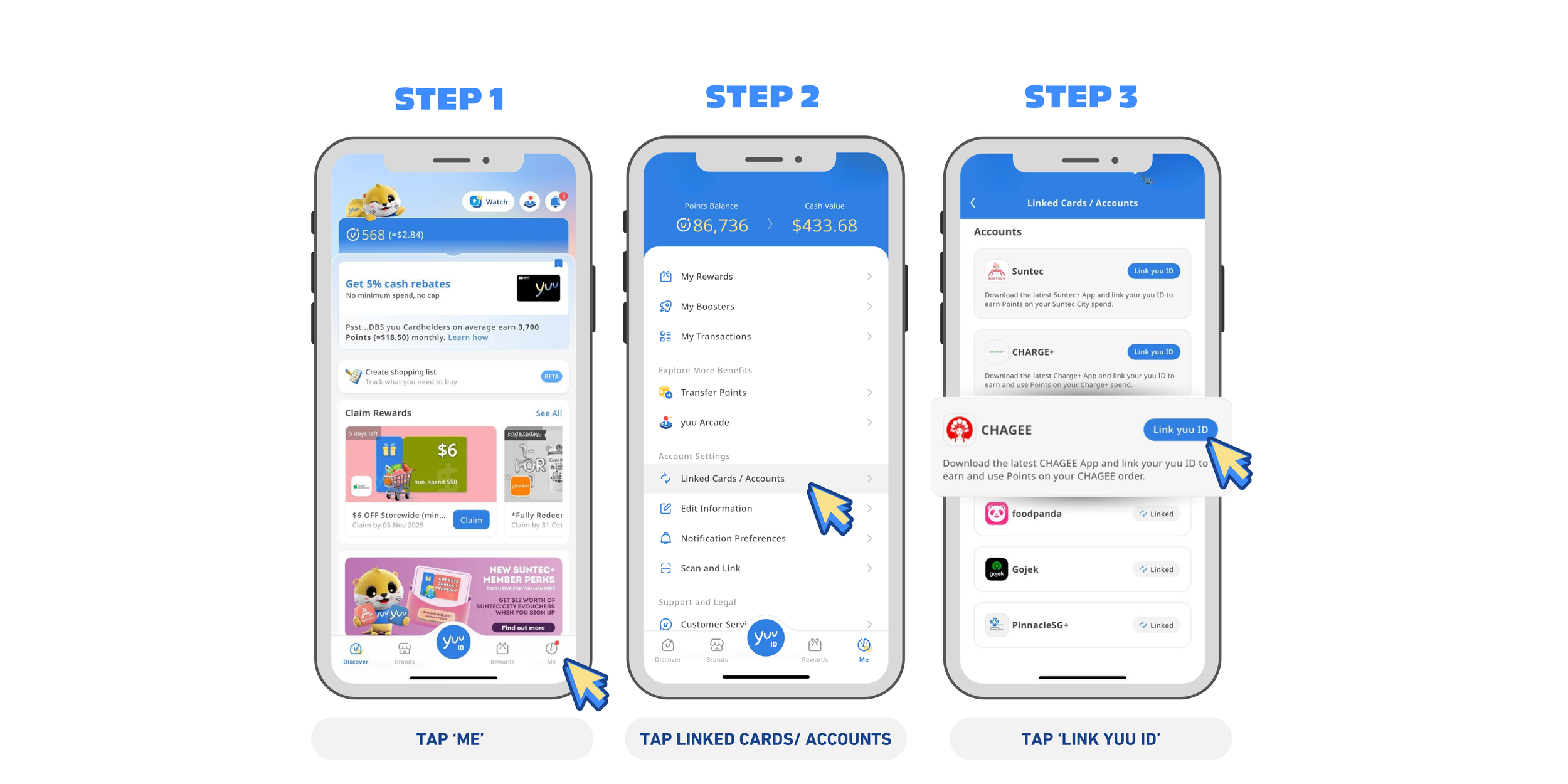
1️⃣ Launch the yuu Rewards Club App on your phone, tap on Me.
2️⃣ Tap Linked Cards / Accounts.
3️⃣ Scroll to Accounts and you’ll see all the yuu Partner options e.g. CHAGEE, Charge+, foodpanda, Gojek, PinnacleSG+, Sindo Ferry and Suntec+. Scroll to the Partner you’d like to link to and tap on Link yuu ID.
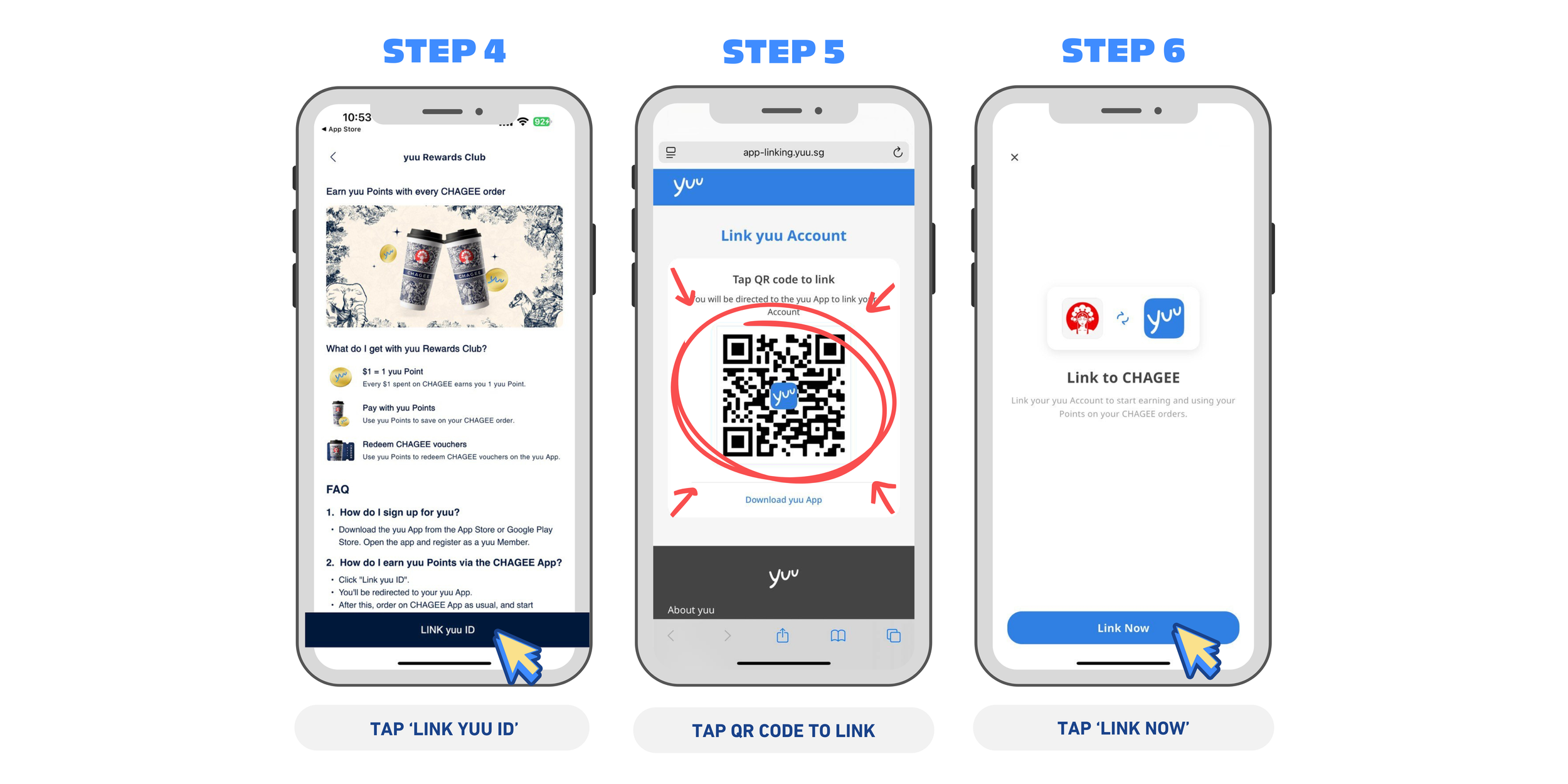
4️⃣ Tap Link yuu ID.
5️⃣ Tap the QR code to link - no need to use an external device to scan it!
6️⃣ Tap Link Now and you’re done! 🎉
That's it! You're now ready to earn yuu Points seamlessly on your orders.
2. Method 2 - Link from Partner Apps
Linking your yuu ID with 7-Eleven and Guardian is just as easy, simply download the respective Apps and follow the steps below!
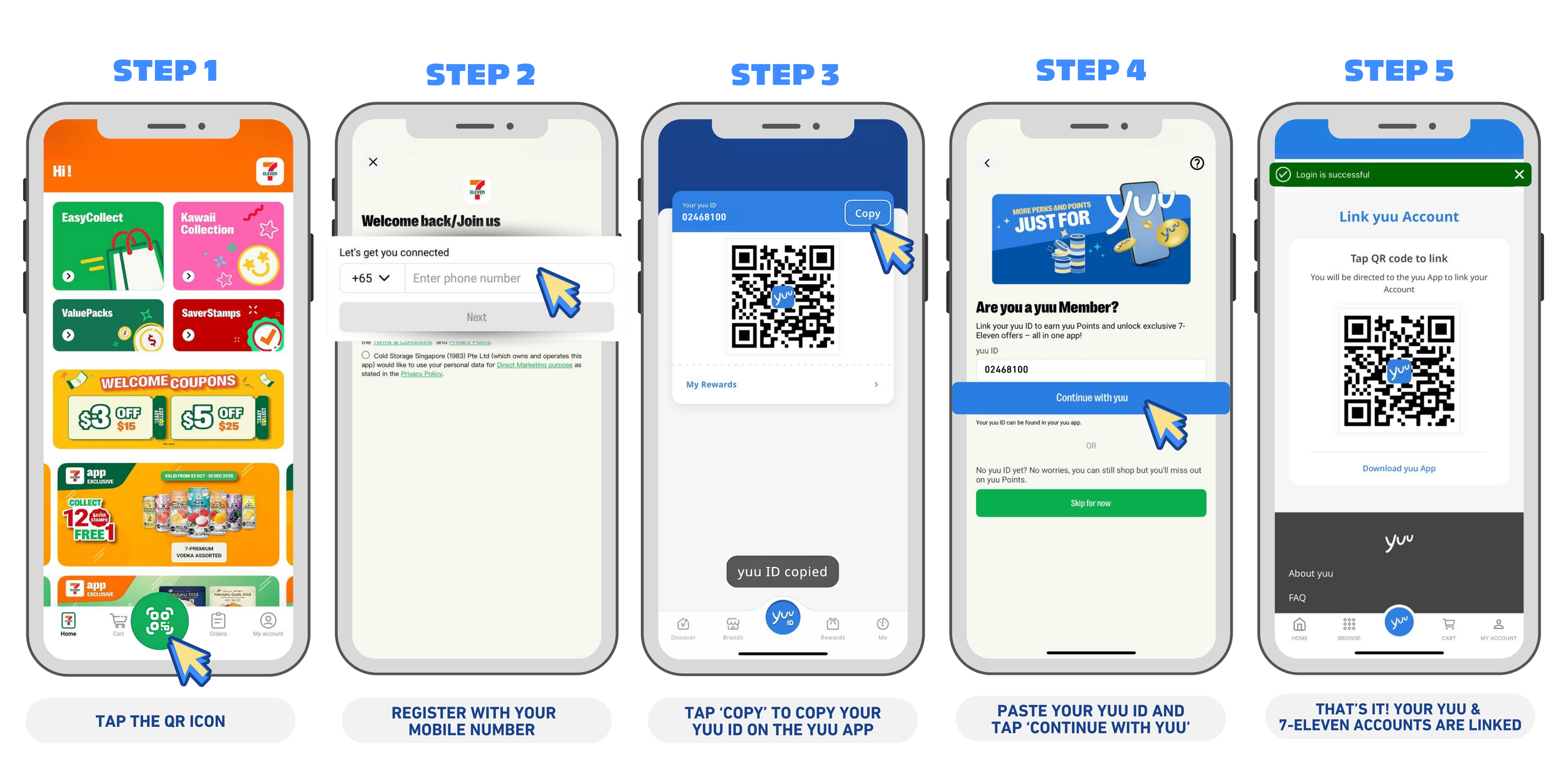
7-Eleven - Copy & Paste your yuu ID, it’s as easy as that!
1️⃣ Download and register on the 7-Eleven App, then tap on the QR icon.
2️⃣ Sign up using your mobile number.
3️⃣ Open the yuu App, tap on your yuu ID, and select Copy to copy your ID.
4️⃣ Return to the 7-Eleven App, paste your 8-digit yuu ID, and tap ‘Continue with yuu’.
5️⃣ Follow the on-screen prompts, then tap on the QR code to complete the final linking process
And that’s it—you’ll earn Points with every 7Cafe Cappuccino on-the-go. ☕✨
🧴 Guardian - One-tap QR Linking
Guardian’s linking process is just as straightforward.
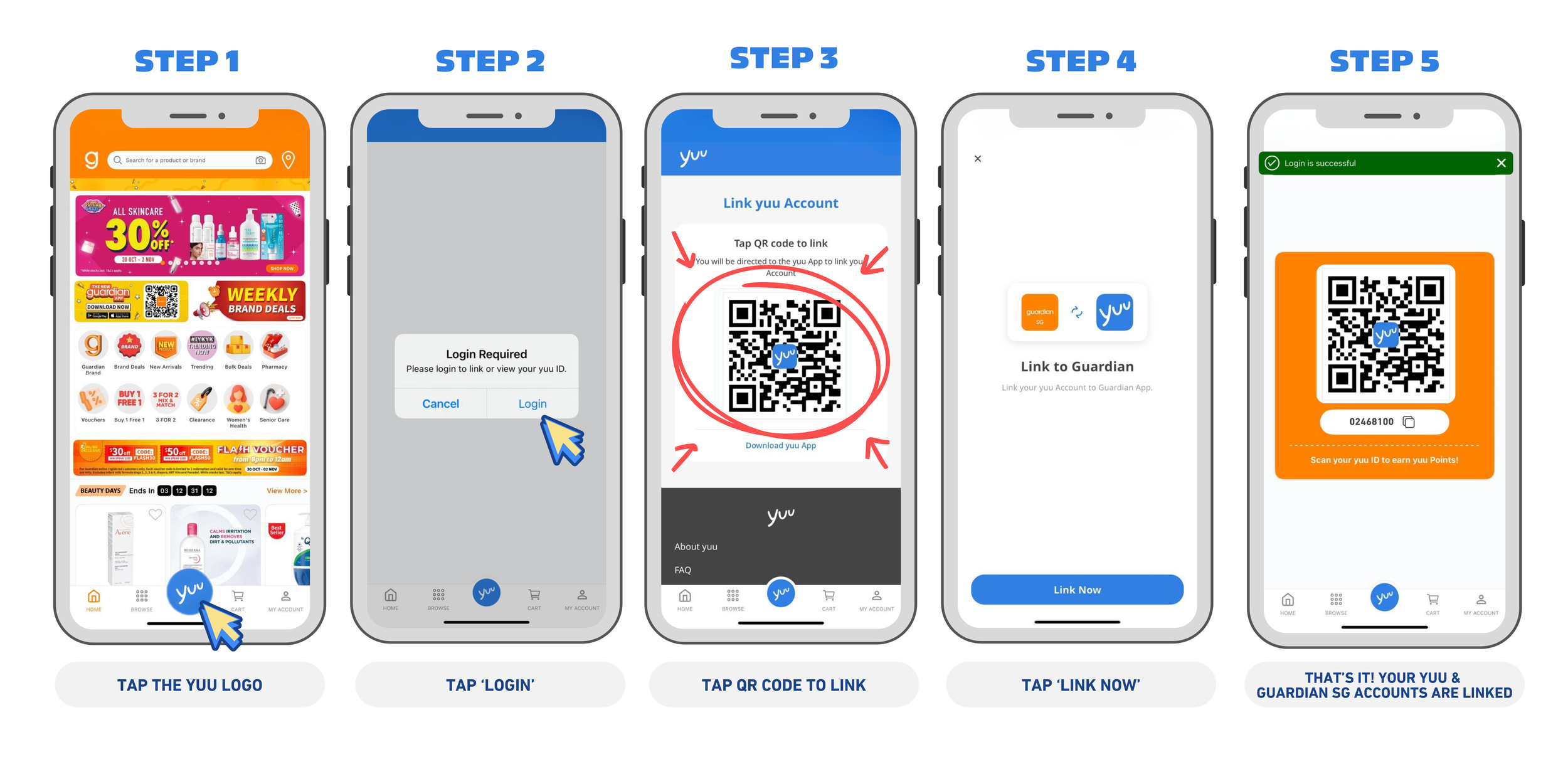
1️⃣ Open the Guardian App & tap the yuu logo on the home screen.
2️⃣ Tap to log in with your email address to view and link your yuu ID.
3️⃣ Follow the prompts and tap the QR code to link.
4️⃣ Tap Link Now to confirm.
5️⃣ Return to the Guardian App and it will indicate that you have linked successfully!
Simply scan your yuu ID from the yuu App when you check out in the future! P.S It works the same way when you scan the yuu ID from your Guardian App as well.
And just like that, you’ll start earning yuu Points with every purchase — from snacks to skincare. It’s quick, easy, and makes your everyday shopping feel more rewarding. ✨
BONUS TIP: Link Your Cards & Power Up Your Points Even Further!
If you’ve got a DBS yuu Card or a PAssion POSB Debit Card, don’t let those yuu Points go to waste! Make sure they’re linked to your yuu App so you can earn (and spend!) your hard-earned Points effortlessly.
With your Cards linked, you can enjoy up to 36x Points (equivalent to 18% cash rebates and 10 miles per dollar) on your everyday purchases—it really adds up faster than you think!
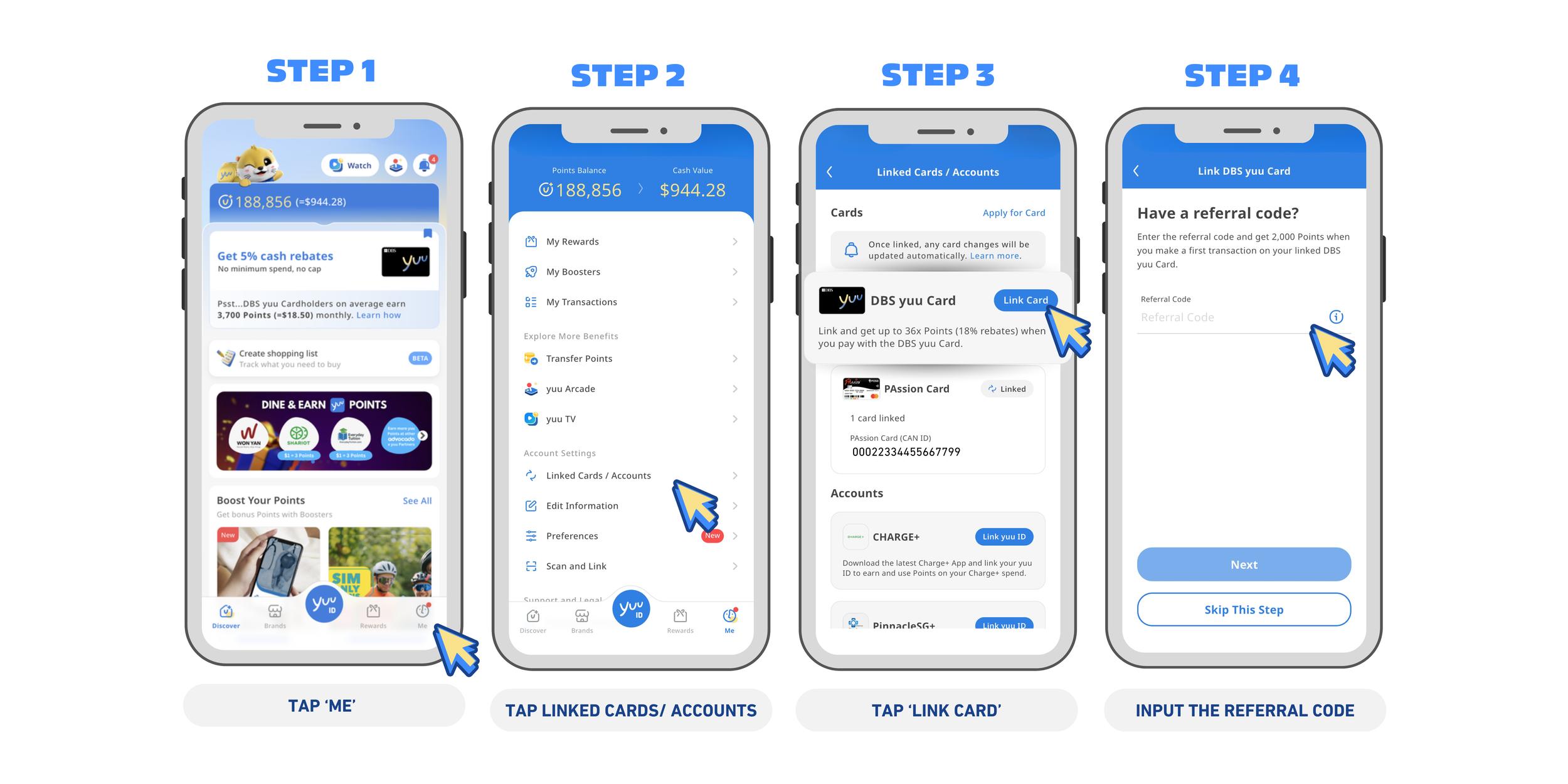
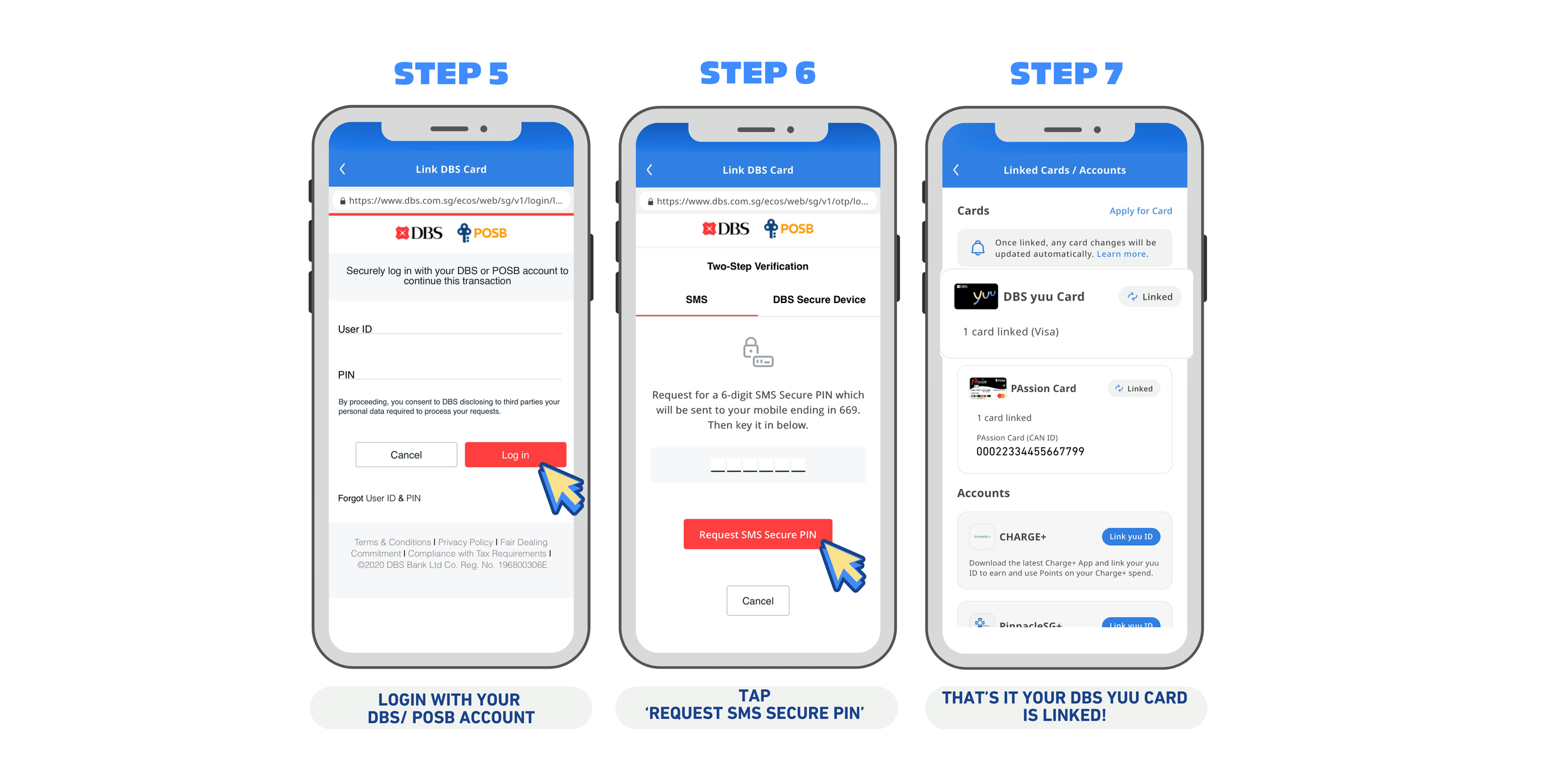
Here’s how to do it for the DBS yuu Card.
1️⃣ Open the yuu Rewards Club App and tap on Me.
2️⃣ Tap Linked Cards / Accounts.
3️⃣ Under the Cards section, you’ll see all available yuu Partner options (e.g. DBS yuu Card or PAssion POSB Debit Card). Tap Link Card.
4️⃣ Enter your referral code, then tap Next.
Psst.. Need a referral code? Use this <OS7I9O7Z> when linking your DBS yuu Card to earn 2,000 yuu Points! Or, ask your friends with the card for their referral code.
5️⃣ Log in to your DBS account by entering your User ID and PIN, then tap Login.
6️⃣ Tap Request SMS Secure PIN and enter the 6-digit code to complete the Two-Step Verification process.
7️⃣ And that’s it, your yuu ID and DBS yuu Card are now successfully linked!
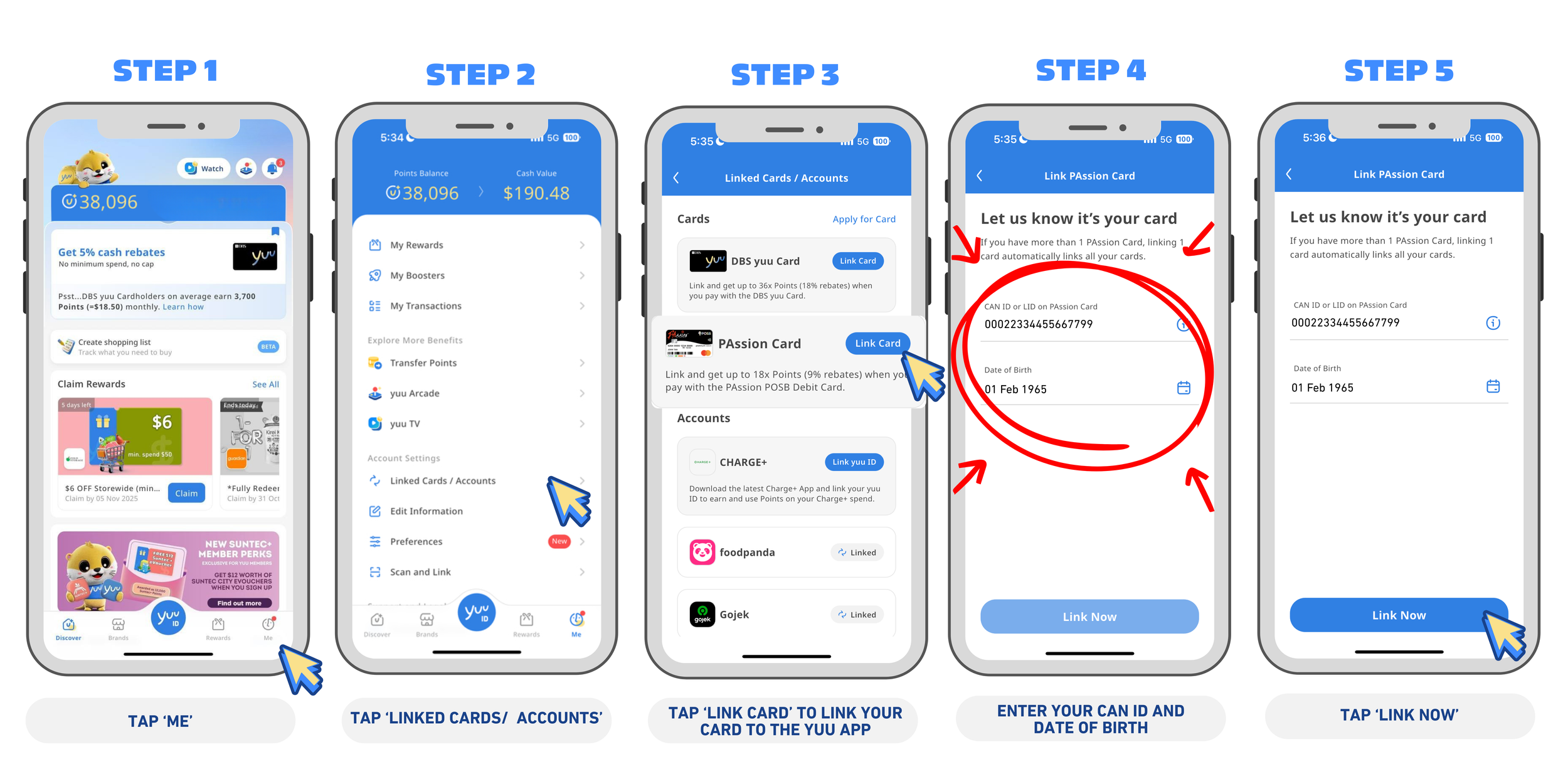
Here’s how to do it for the PAssion POSB Debit Card.
1️⃣ Open the yuu App and tap on Me.
2️⃣ Tap Linked Cards / Accounts.
3️⃣ Under the Cards section, you’ll see all available yuu Partner options (e.g. DBS yuu Card or PAssion POSB Debit Card). Tap Link Card.
4️⃣ Enter your CAN ID or LID on your PAssion Card as well as your Date of Birth (DOB)
5️⃣ Tap Link Now. And that’s it, your yuu ID and PAssion POSB Debit Card are now successfully linked!
Frequently Asked Questions (FAQ) 💬
How do I check if my accounts are linked?
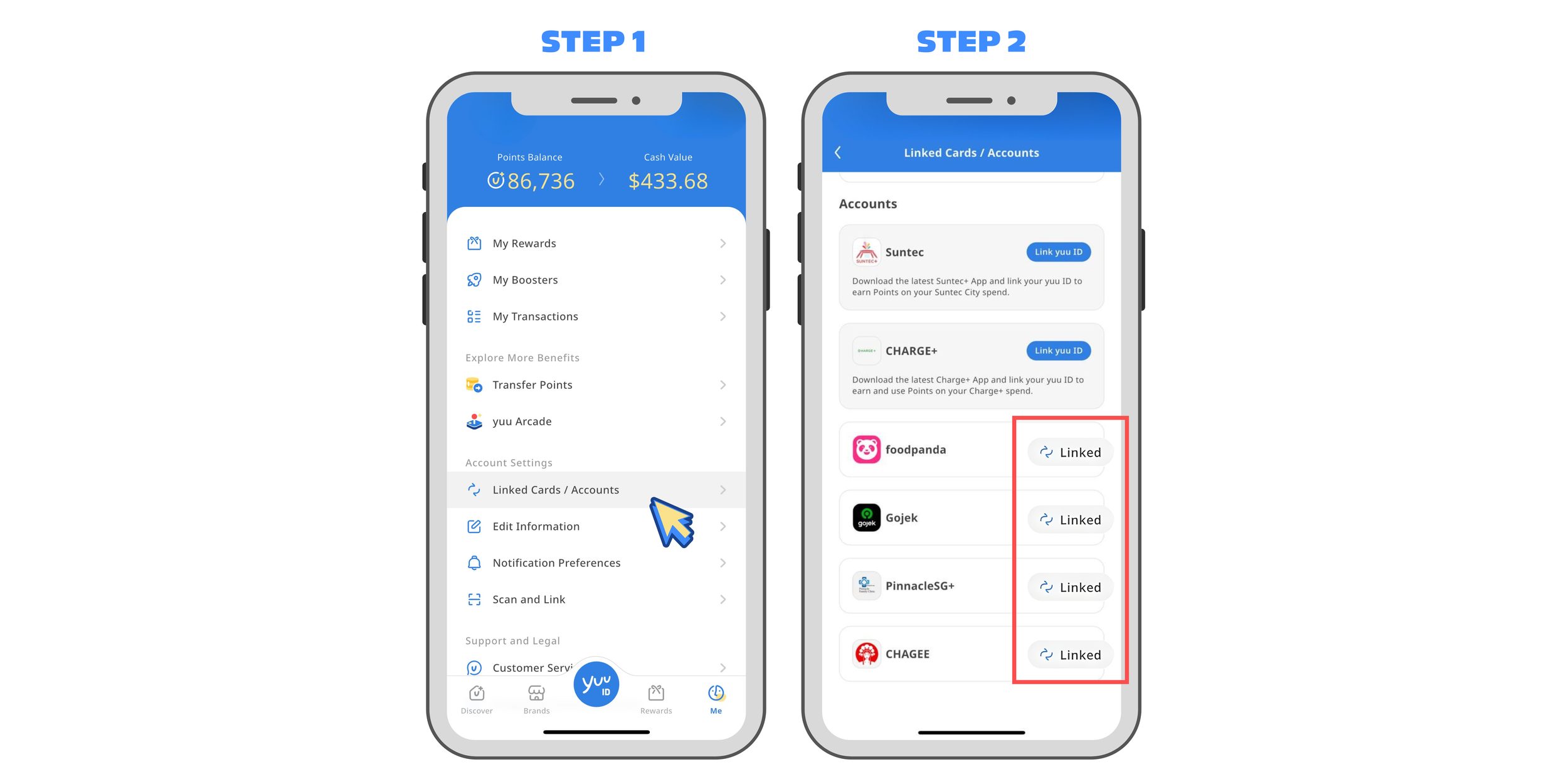
✅ Not sure if your card is linked? Simply open the yuu App and check under Linked Cards/Accounts to confirm.
✅ Look for a “Linked” status under Linked Cards/Accounts.
Having trouble linking?
✅ Ensure both your yuu App and yuu Partner App are updated to the latest version.
✅ Still stuck? Contact yuu Customer Service—they’ll sort it out.